Sudoku is easy to learn: fill the grid so that each row, column and 3×3 box has the digits 1 to 9 exactly once. This guide explains the sudoku rules, the controls and a worked example from a real puzzle, step by step — ideal if you are learning how to play sudoku for the first time.
A ManyPlay browser walkthrough · Checked . Screenshots below show the actual game. Illustrated catalog covers are presentation artwork. Who publishes these games?
Worked example from a real Easy puzzle
Start here
New to sudoku? Start with an Easy puzzle. Look for a cell where only one digit fits, or a digit that has only one place left in its row, column or box. Turn on Notes to pencil in small candidate digits, then turn Notes off to enter your answer. Your current puzzle is saved in this browser, so you can close the page and finish it later.
The rules you need
Fill each row, column and 3×3 box with the digits 1–9, each digit once.
Tap an empty cell, then tap a digit. The starting digits cannot be changed.
Turn on Notes to pencil in candidates; turn it off to enter a final digit.
Stuck? Hint explains the next logical step, and Place enters it. Undo takes back any move.
The 6×6 board uses the digits 1–6 and boxes of two rows by three columns.
Worked example: why only 9 fits
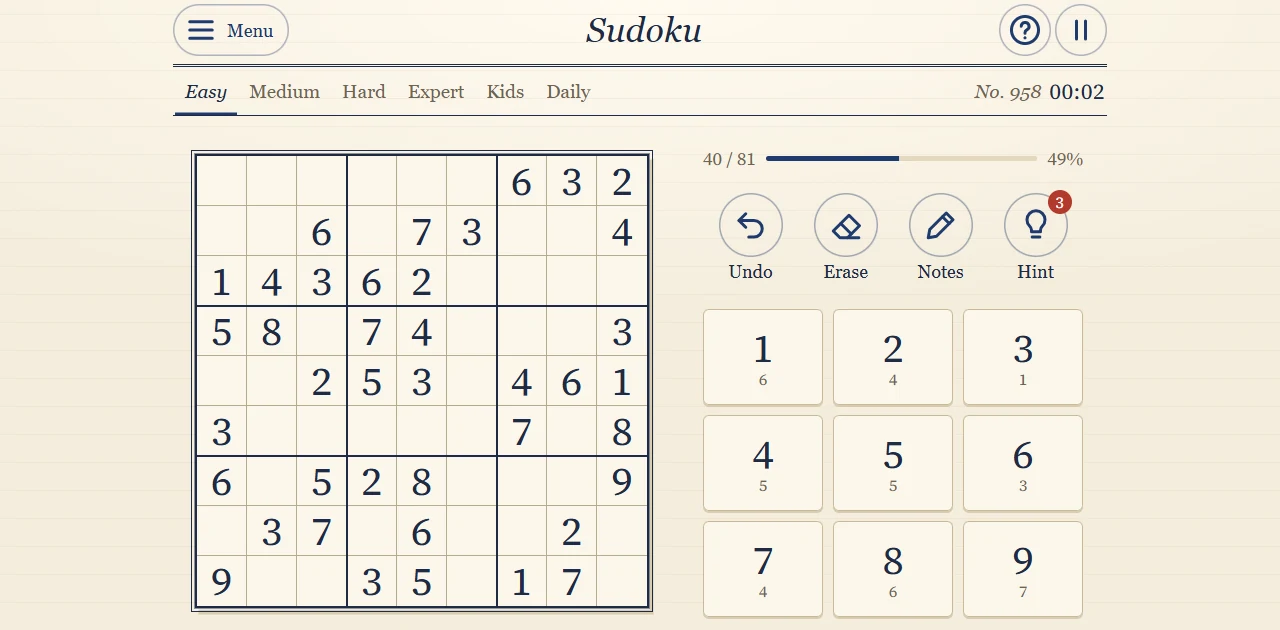
Here is a real Easy puzzle from the game. Look at the empty cell in row 4, column 8. Row 4 already contains 8, 3, 7, 4 and 5, so the cell could still hold 1, 2, 6 or 9. Column 8 already has 2, 3, 6 and 7, which leaves 1 or 9. The 3×3 box on the middle right already contains a 1 — so the only digit left for this cell is 9.
A real Easy puzzle before the first move.
Ask for a hint
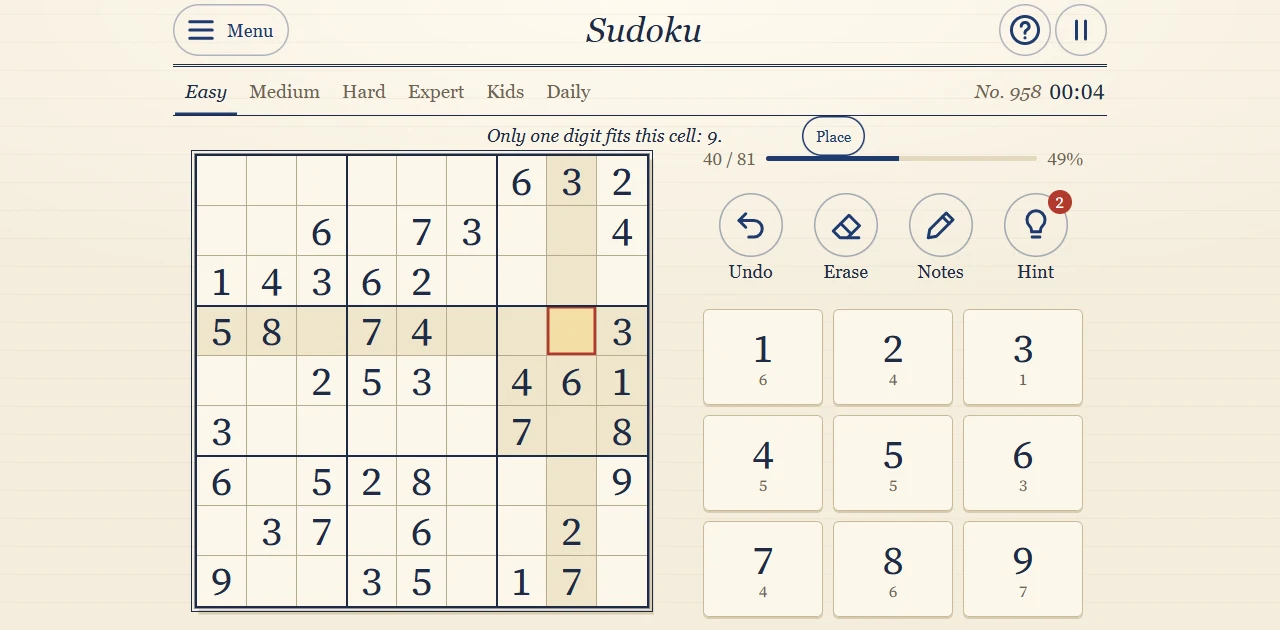
Press Hint. The game highlights the cell and explains: only one digit fits this cell — 9. Opening the hint uses one of your three free hints, so the counter drops from 3 to 2.
Ask for a hint — actual result
Place the digit
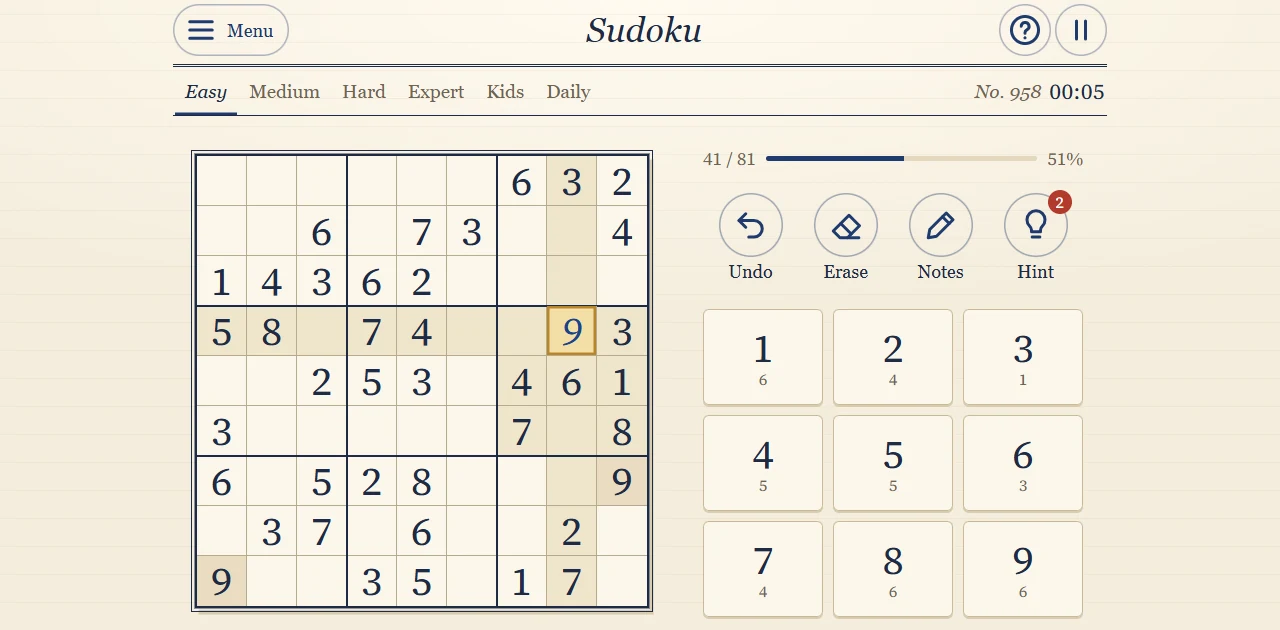
Press Place. The 9 appears in row 4, column 8, and the small counter under the 9 key drops from 7 to 6: six more nines to place.
Place the digit — actual result
Undo, then try Notes
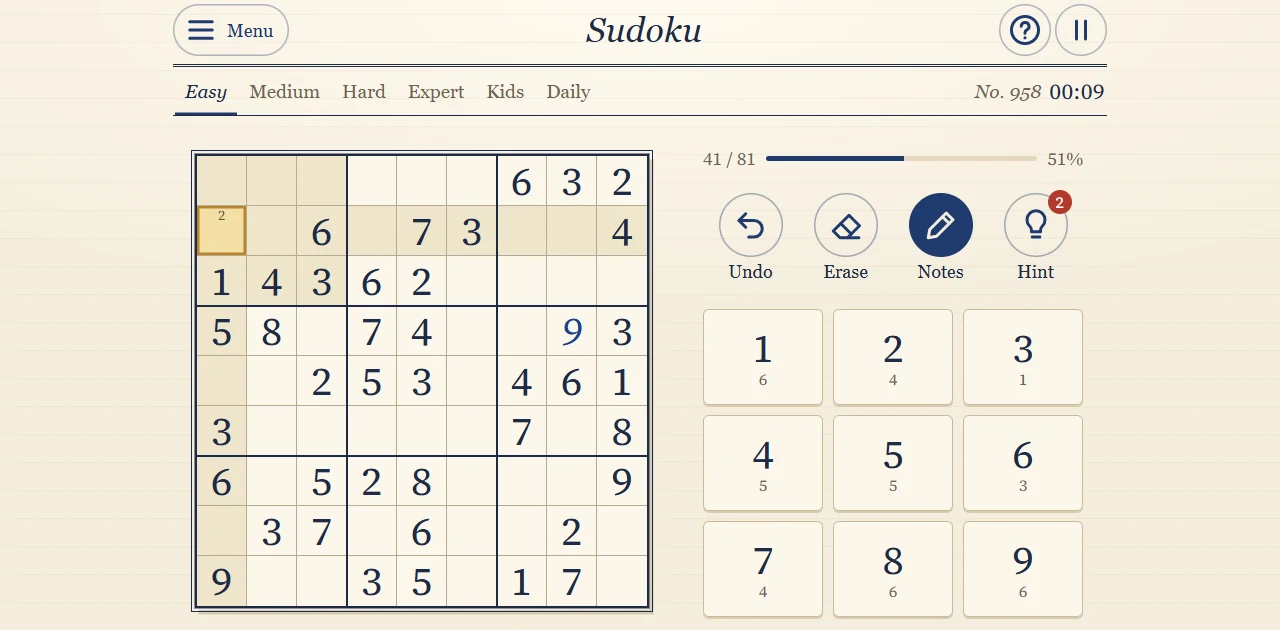
Undo removes the 9 again; the hint stays used. Enter the 9 yourself by tapping the cell and then the 9 key. Next, turn on Notes and tap 2 in an empty cell to pencil in a candidate. Reload the page: your digit, your note, the time and the remaining hints are all still there.
Undo, then try Notes — actual result
What this example teaches
This is how every sudoku move works: combine what the row, the column and the box rule out until only one digit remains. No guessing is needed. Notes keep track of the candidates you have not ruled out yet, and the small counters under the keys show how many of each digit are still missing.
Mistakes to avoid
Check the row, the column and the box before placing a digit — not just one of them.
Keep your notes complete: a missing candidate can hide the next move.
After each placement, scan the same row, column and box — the next move is often nearby.
Undo takes back a move, but it does not give back a hint you already used.
Sudoku rules: common questions
What are the rules of sudoku?
A sudoku is a 9×9 grid divided into nine 3×3 boxes. Fill every empty cell with a digit from 1 to 9 so that each row, each column and each box contains every digit exactly once. The starting digits are fixed and cannot be changed.
How to play sudoku for beginners: where do I start?
Pick one digit and look for the box where it has only one possible cell. Then look for a cell where only one digit fits. Easy puzzles can be finished with just these two techniques. Use Notes when you want to remember several possibilities for a cell.
What is the difference between a conflict and a mistake?
A conflict is a digit that appears twice in one row, column or box — both cells turn red. A mistake breaks no rule yet but does not match the solution; by default the game underlines it. Neither ends the game: just fix the cell and carry on.
Do I ever need to guess?
No. Every puzzle has one solution that you can reach by logic alone. If you are stuck, a hint shows the next logical step and which technique it uses.
Can I play sudoku with a keyboard?
Yes. Type 1 to 9 to place a digit, use the arrow keys to move, Backspace to erase, Ctrl+Z to undo, N to switch Notes, H for a hint and P to pause.
What do the numbers under the digit keys mean?
They show how many of that digit you still have to place. When a count reaches zero, the key goes dark because that digit is complete.
Other modes and further play
Besides Easy, the game has Medium, Hard and Expert puzzles, a daily sudoku, a smaller 6×6 board and a Big digits option for easier reading. Every puzzle comes with three free hints.
Report a changed rule or control. Browser and Android editions can differ; the checked date describes this walkthrough, not a new game release.
UNDERSTAND THE NEXT DECISION
Sudoku game rules and controls in detail
Everything you need to know about how to play a sudoku puzzle in this game: how to enter digits and notes, what the counters mean, how the game shows conflicts and mistakes, and what each level asks of you.
How to place digits
Tap an empty cell, then tap a digit in the row of keys under the grid. Tapping the same digit again in the same cell removes it. There is a faster way on a phone: hold a digit key for a moment until it glows. The digit stays selected, and every tap on an empty cell places it. Tap the glowing key again to let it go. On a computer you can also type: digits 1 to 9 place a digit, the arrow keys move between cells, Backspace erases, Ctrl+Z undoes, N switches notes, H asks for a hint and P pauses the game.
How many are left
Under every digit key there is a small number: how many of that digit you still have to place. Nine fives in a solved grid, minus the fives already given, minus the fives you placed correctly. When the count reaches zero, the key goes dark, because that digit is complete.
Notes
On harder puzzles you will want to write candidates: the digits that could still go in a cell. Switch on Notes and tap digits to add or remove small notes in the selected cell. When you place a digit, the game removes the same note from every cell in its row, column and block, so your notes stay accurate. The eraser removes a digit you placed, or, in a cell without a digit, all of its notes.
Conflicts and mistakes
If a digit appears twice in one area, both cells turn red: that is a conflict, and it breaks the rule right away. A mistake is different: a digit that breaks no rule yet but does not match the solution. By default the game underlines mistakes as soon as you make them. If you prefer to find them yourself, turn off Show mistakes at once in the settings; then a Check button appears and marks the mistakes only when you press it. Either way a mistake never ends the game. There is no limit on mistakes and no second chance to buy: you simply fix the cell and go on.
Levels
Easy puzzles give 36 to 42 digits and need only single candidates. Medium puzzles give 30 to 35 and need locked candidates. Hard puzzles give 26 to 31 and need pairs or triples. Expert puzzles give 22 to 27 and need X-wings, XY-wings or the swordfish. Kids play on a 6×6 grid with digits 1 to 6.
Hints and saving
Every puzzle comes with three free hints. A hint highlights the next logical step and explains it; press Place to enter the digit. Undo takes back a move but does not give back a hint you already used.
Your current puzzle is saved in this browser, including notes, time and remaining hints. Clearing site data, switching browser or starting another puzzle can replace it.