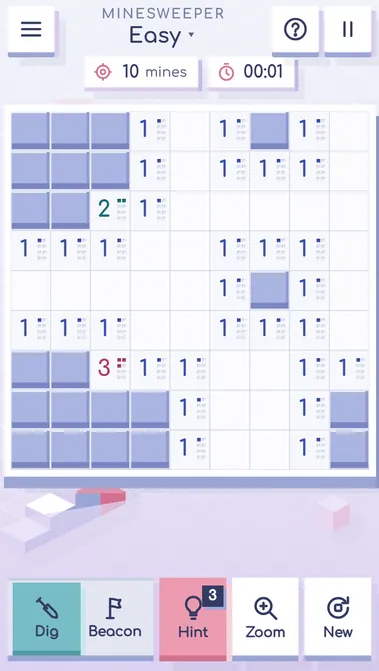
Minesweeper is the classic logic puzzle: open every cell of the field that hides no mine. Each opened cell shows how many mines touch it, and the numbers lead you to the safe cells. Your first click is always safe. Mark proven mines with flags, chord around them to open many cells at once, and use one of three free hints when the numbers run out. Play easy 9×9, medium 16×16 or hard 30×16, the Daily field or the Expedition of 12 platforms. On a phone the board zooms to big cells and holding a finger sets a flag. Minesweeper runs in your browser on a phone, tablet or computer — no download needed.
Minesweeper is about reading the numbers, not about luck: almost every move is proven by the cells you have already opened.
New to Minesweeper? Start on Easy, the 9×9 board with 10 mines. Your first click is always safe and opens an area with numbers. The counter at the top shows how many mines are left, and the Hint button shows how many free hints you still have.
Before your next move
A beacon on a guessed mine is dangerous: sooner or later a chord trusts it and opens the real mine. Set beacons only where the numbers prove a mine.
Opening cells at random after the first click throws away the numbers. Read the border of the open area first.
Browser edition
Play in your browser. No app download is needed.
Questions about Minesweeper
What do the numbers mean in Minesweeper?
A number on an opened cell is how many mines lie among its 8 neighbours, diagonals included. A 1 means exactly one of the closed cells around it is a mine; a 3 means three. A cell with no number has no mines around, and the game opens its neighbours for you.
Can I lose on the first click?
No. The mines are laid only after your first click, and the cell you open and all its neighbours are kept free of mines. So the first click always opens a small area with numbers, and the game starts from something you can read.
What is chording?
Chording opens all the remaining neighbours of a number at once. Tap a number that already has as many flags around it as its value, and every other closed cell next to it opens. It saves many clicks, but if one of the flags is wrong, a mine will open.
Original ManyPlay game. Controls and examples were checked against the browser edition; cover illustrations are labelled separately from gameplay captures. Report a changed rule or control.