Minesweeper rules in one sentence: open every cell that hides no mine, using the numbers to find the mines. Below is a real Easy board from the game, step by step, and then every rule in detail.
A ManyPlay browser walkthrough · Checked . Screenshots below show the actual game. Illustrated catalog covers are presentation artwork. Who publishes these games?
Verified opening-board solution
Start here
New to Minesweeper? Start on Easy, the 9×9 board with 10 mines. Your first click is always safe and opens an area with numbers. The counter at the top shows how many mines are left, and the Hint button shows how many free hints you still have.
The rules you need
Open every cell that hides no mine; you do not have to flag the mines.
A number shows how many mines lie among its 8 neighbours, diagonals included.
Mark a cell you have proven to be a mine with a flag (a beacon in this game): right click, or hold on a phone.
A number with as many beacons as its value makes all its other neighbours safe; tap it to chord.
Stuck? A hint opens a cell the numbers prove safe; three hints are free in every game.
Worked example: a proven mine, a beacon and a hint
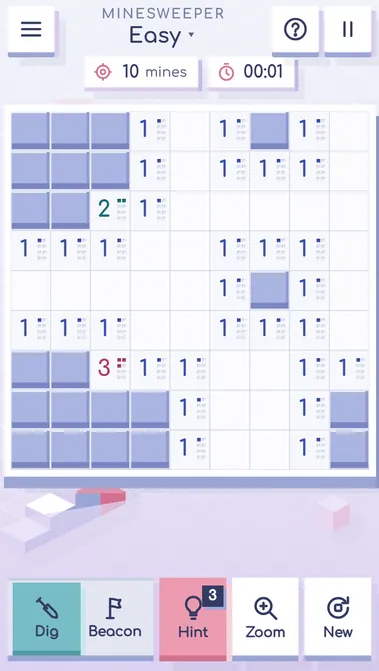
Here is a real Easy board. The first click in the middle of the field opened a large area at once — 59 of the 81 cells. In the top row, the 1 in column 6 touches only one closed cell: the cell to its right, column 7.
Actual Easy board after the first click in the middle: 59 cells open, 10 mines on the counter, 3 hints.
Find a 1 with one closed neighbour
The 1 in column 6 of the top row has a single closed cell next to it, in column 7. That 1 needs exactly one mine, so the closed cell must be the mine.
Find a 1 with one closed neighbour — actual result
Set a beacon on the proven mine
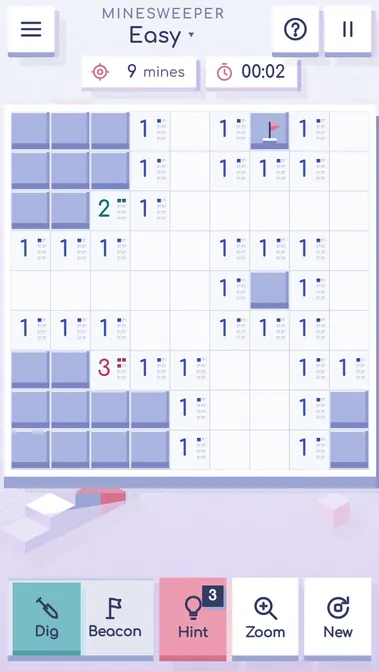
Right click the cell in column 7 (on a phone, hold your finger on it). A beacon appears, and the counter at the top drops from 10 mines to 9.
Set a beacon on the proven mine — actual result
Ask for a hint
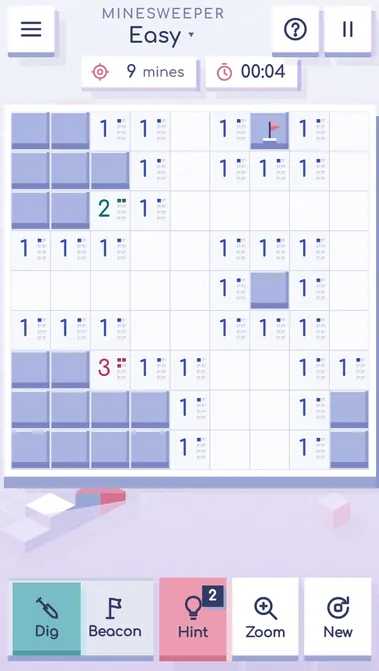
Press Hint. The game opens a closed cell that the numbers prove safe — here column 3 of the top row, which shows a 1 — and the badge on the Hint button drops from 3 to 2.
Ask for a hint — actual result
Why this sequence works
A 1 that touches only one closed cell leaves no choice: that cell is the mine. Beacons on proven mines then make the cells around them safe to open. That is the heart of Minesweeper strategy: when a number has exactly as many closed neighbours as its value, all of them are mines; when it already has as many beacons as its value, all its other neighbours are safe.
Mistakes to avoid
A beacon on a guessed mine is dangerous: sooner or later a chord trusts it and opens the real mine. Set beacons only where the numbers prove a mine.
Opening cells at random after the first click throws away the numbers. Read the border of the open area first.
Questions about this board
What do the numbers mean in Minesweeper?
A number on an opened cell is how many mines lie among its 8 neighbours, diagonals included. A 1 means exactly one of the closed cells around it is a mine; a 3 means three. A cell with no number has no mines around, and the game opens its neighbours for you.
Can I lose on the first click?
No. The mines are laid only after your first click, and the cell you open and all its neighbours are kept free of mines. So the first click always opens a small area with numbers, and the game starts from something you can read.
What is chording?
Chording opens all the remaining neighbours of a number at once. Tap a number that already has as many flags around it as its value, and every other closed cell next to it opens. It saves many clicks, but if one of the flags is wrong, a mine will open.
Other modes and further play
The menu also has the Medium and Hard boards, the Daily field and the Expedition of 12 platforms. This example checks one Easy board in the browser build, not every level or mode.
Report a changed rule or control. Browser and Android editions can differ; the checked date describes this walkthrough, not a new game release.
UNDERSTAND THE NEXT DECISION
Minesweeper rules in detail
Minesweeper is a logic puzzle on a grid of closed cells. Some cells hide mines. Your task is to open every cell that does not hide a mine. You never see the mines directly: every cell you open shows a number, and the numbers tell you where the mines can and cannot be. This guide explains how to play Minesweeper from the first click to the last, with every rule of the game on this site.
The field and the levels
There are three levels. Easy is a field of 9 by 9 cells with 10 mines. Medium is 16 by 16 with 40 mines. Hard, the classic expert board, is 30 by 16 with 99 mines. The counter at the top shows how many mines are left: the number of mines minus the number of flags you have placed. If the counter goes below zero, you have placed more flags than there are mines, so at least one flag is wrong.
On a phone, the easy field fits the screen whole. The medium and hard fields open in an overview; press the zoom button or pinch to make the cells big enough for a finger, and drag with one finger to scroll. On a phone the hard field is turned upright, 16 cells wide and 30 tall, so it uses the tall screen.
The first click
Your first click is always safe. The mines are placed only after it, and the cell you open together with its neighbours never holds a mine. That is why the first click usually opens a whole area at once and gives you numbers to read. There is no luck in how a game begins.
What the numbers mean
Every opened cell has up to 8 neighbours: the cells to the left, right, above, below and on the four diagonals. A cell on the edge has 5 neighbours, a corner cell has 3. The number on an opened cell is how many mines are among its neighbours. A 1 means exactly one neighbour is a mine. A 2 means two, and so on up to 8.
In this game every number also has its own code, a small pattern of niches carved into the block, so a number can be read by its shape as well as by its digit.
If an opened cell has no mines around it, it shows no number. Such a cell opens all its neighbours at once, and if some of them have no mines around either, the opening spreads further. This is the cascade: one click can open a large part of the field, and it always stops at a border of numbers. A cascade never opens a mine.
Opening cells
Tap a closed cell on a phone, or left click it on a computer, to open it. If it hides a mine, the game is lost. If not, you see its number or a cascade. Take your time: there is no penalty for thinking, and the clock only matters for your record.
Flags, which this game calls beacons
When the numbers prove that a closed cell hides a mine, mark it with a flag. In this game the flag is called a beacon. On a computer, right click the cell. On a phone, hold your finger on the cell for a moment. You can also switch the panel from Dig to Beacon: then every tap sets or removes a beacon, and you switch back to Dig to open cells. A cell with a beacon cannot be opened by a tap, which protects you from opening a mine by mistake.
In the settings you can add a question mark to the beacon cycle. Then a second tap on a beacon turns it into a question mark, a note for a cell you are not sure about, and a third tap clears it.
Beacons are a tool, not a goal. You do not need to place a beacon on every mine to win.
Chording
Chording opens many cells with one tap. Tap an opened number that already has exactly as many beacons around it as its value: all the other closed neighbours of that number open together. For example, a 2 with two beacons next to it opens the remaining closed cells around it. If the number of beacons does not match, the chord does nothing and the cells shake to show why.
Chording is fast, but it trusts your beacons. If one of them stands on a cell without a mine, the chord opens the real mine and the game is lost. Chord only around beacons the numbers have proven.
Winning and losing
You win when every cell without a mine is open. The mines do not need beacons. The game shows your time, whether the win was clean (without hints), your record for the level and your win streak.
You lose when you open a mine. The field then shows every mine, marks the one that went off, and crosses out every beacon that stood on a cell without a mine, so you can see what went wrong. You can start a new field or play the same field again: the same mines, with the same first click already open.
Time, records and statistics
The time runs from your first click until the win or the loss. It stops when you pause, open the menu, or switch to another tab; a paused field is hidden so the clock stays fair. The record of a level is the best time of a win without hints. The statistics show how many games you started and won on each level, your share of wins, your average win time and your streak.
Hints
When you are stuck, press Hint. The hint finds a closed cell that the numbers prove safe, shows the numbers that prove it, and opens it. If no cell can be proven safe, which happens in the classic game when the numbers leave a real guess, the hint opens a safe cell for you and says that a guess was needed. Every game gives you three free hints. A win with hints counts as a win, but not for your record.
The Daily field
The Daily field is one board for everybody on the same day, at the level you choose. Its first cell is the centre of the field and is already open when the game starts. Win it on several days in a row to grow your daily streak. The Daily field needs a connection, because the date comes from the server.
The Expedition
The Expedition is a stair of 12 platforms. The first platform is a small 8 by 8 field with 7 mines; each next platform is larger or denser, up to the full 30 by 16 board with 99 mines. Win a platform to open the next one. Win a platform without hints to earn its star. Your best time on each platform is kept, and you can replay any platform you have opened.
A short checklist
Open a cell; read the numbers; place beacons only on proven mines; chord around them; use a hint when you need one. That is how to play Minesweeper. The rest is practice, and every game makes the numbers easier to read.
Explanation checked 2026-11-08. Studio rules guide docs/page/content/guides/en.rules.txt (spec 04, written to the game spec; studio gates 33/33 on f228fbc), checked against the build 0b5d070: levels 9×9, 16×16 and 30×16, the safe first click, beacon and mine counter, hint and its badge confirmed in the browser 2026-11-08