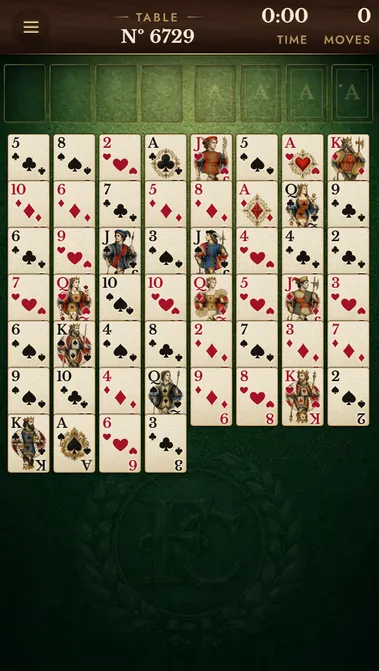
Easy FreeCell plays by the classic rules with 4 free cells, but the deals are picked for a gentle start. We chose 861 of the 32,000 numbered deals where the Aces and Twos lie near the top of their columns, with few cards on them, so the foundations open early and the game flows. It is a good table for a first game, for a short break, or for learning how runs and empty columns work. Undo and hints are unlimited, and every deal can be won.
How to play
Move all 52 cards to the four foundations, building each suit from Ace up to King. All cards are dealt face up into 8 columns. Move the top card of a column onto a card one rank higher and of the opposite colour, into one of the free cells, into an empty column or onto its foundation. You can carry a whole ordered run when there is room to move it one card at a time. Tap a card to send it to its best place, or drag it; when every column is in order, press Finish.
Questions about Easy FreeCell Solitaire
Is easy FreeCell free?
Yes. It is the same free FreeCell in your browser, with no download and no account, opened on the easy deals.
What makes an easy deal easy?
The Aces and Twos lie near the top of their columns with few cards on them, so you can send them home early and open the game.
FreeCell is the solitaire you win by thinking, not by luck: all 52 cards are dealt face up into 8 columns, so the whole game is in front of you from the first move. Use the 4 free cells and empty columns to dig out the Aces, build down in alternating colours and send every suit home from Ace to King. Undo and hints are unlimited. Pick a classic table, a gentle Easy deal, FreeCell Hard with only 3 free cells, or the daily evening table that everyone plays. Every table has its number, so you can replay it. FreeCell runs in your browser on a phone or a computer, free, with no download.
FreeCell is about planning, not luck: every card is face up, so each move can be checked before you make it.
New to FreeCell? Start with a classic table. All 52 cards lie face up in 8 columns; above them are 4 free cells on the left and 4 foundations on the right. The plate at the top shows the table's number, the time and your moves.
Before your next move
Parking cards in the free cells just to see what is under them fills the cells fast; with no free cell left you can carry only one card at a time.
Dropping a single card into an empty column wastes it: an empty column doubles the run you can move.
Browser edition
Play in your browser. No app download is needed.
Questions about FreeCell
Is every FreeCell game solvable?
Almost. Of the 32,000 classic numbered deals only one cannot be won, and this game never deals it.
How many cards can I move at once?
One card plus one for each empty free cell, doubled for each empty column. With 4 empty free cells and no empty column that is 5 cards.
Do cards go home automatically?
No. You send a card home with a tap or a drag. Only when every column is in order does the Finish button appear and play the rest.
Original ManyPlay game. Controls and examples were checked against the browser edition; cover illustrations are labelled separately from gameplay captures. Report a changed rule or control.