Start here
New to Word Burrow? Type a 5-letter word and press Enter; the tiles tell you which letters fit. You have 6 tries.
 NewWord Burrow
 NewPurr Pieces
 NewTic Tac Toe
 NewHangman
 NewMahjong Connect
 NewLudo
 New3D Snake
 NewBubble Shooter
 NewBlock Puzzle
 NewCrossword
 NewWord Search
 New2048
 NewFreeCell
 NewChess
 NewMinesweeper
 NewMahjong
 Dead Moon Relay
 Gridora
 COMET
 Molecular
How to play Word Burrow in one sentence: guess the 5-letter word in 6 tries and read the colours of the tiles. Below are real rows from ManyPlay, step by step, and then every rule in detail.
Play Word Burrow →A ManyPlay browser walkthrough · Checked . Screenshots below show the actual game. The catalog image is also a real browser capture. Who publishes these games?
Verified opening-board solution
New to Word Burrow? Type a 5-letter word and press Enter; the tiles tell you which letters fit. You have 6 tries.
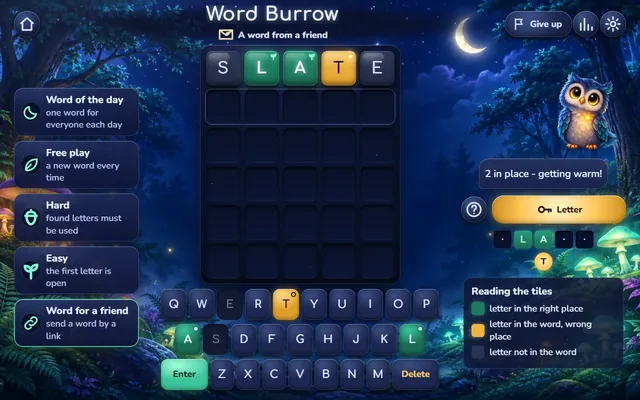
Here are real rows from the ManyPlay build of Word Burrow on a computer. The first guess of a game is SLATE.
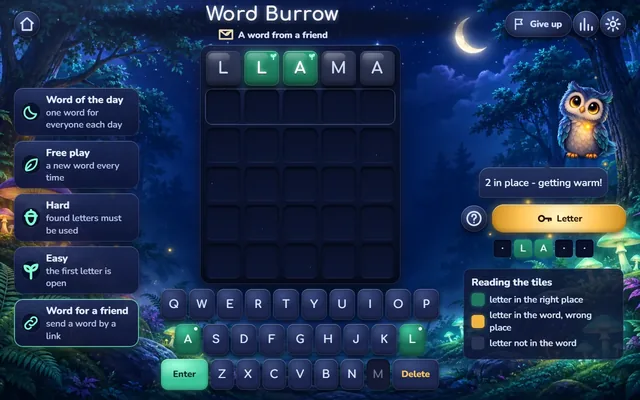
Against an answer with one L in the second place and an A in the third, the guess LLAMA lights up only the second L and the first A: the extra L and the extra A turn grey.
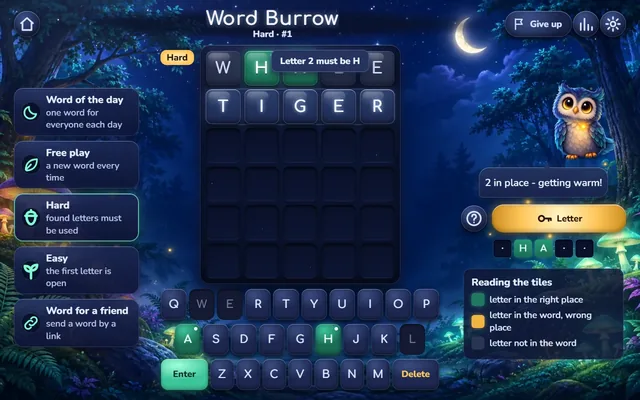
In hard mode, after a row with a green H in the second place, the guess TIGER is refused with the note Letter 2 must be H, and the try is not spent.
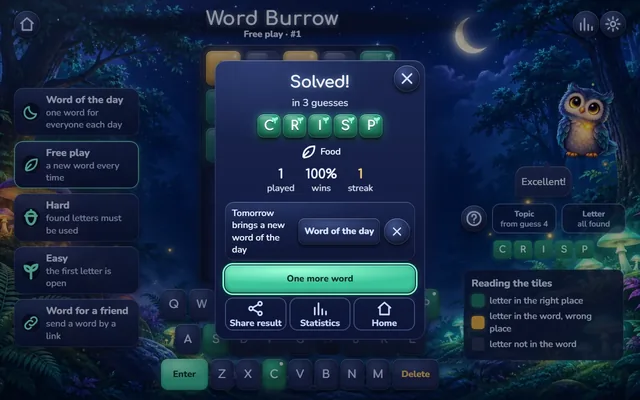
In another free game, CRISP turns all five tiles green on the third guess; the win window shows its topic, Food, and the statistics.
Every colour tells you something: use green letters in place, move yellow ones, and never type a grey letter again.
The letter is not in the word at all, unless it is an extra copy of a letter the answer holds once.
No. A guess that is not a word, is too short or breaks the hard mode rule is refused, and you keep the try.
From your fourth guess, outside hard mode. It gives the topic, never a letter.
The game also has the word of the day, easy mode, Word for a friend and the letter hint. This example shows rows of free and hard games in the build, not every mode.
Report a changed rule or control The date describes this walkthrough, not a new game release.
Learn how a guess is checked, what the colours mean, how repeated letters count and what the hints and modes do. Then find a word in your browser.
Find the hidden 5-letter word in 6 guesses or fewer. Every answer is a common word of its language: no names, no abbreviations and no rare words that only a dictionary knows. Each word language has its own list of answers, close to 1000 words, so a game in French is a French puzzle, not a translated English one.
Type any real 5-letter word and press Enter. On a phone you tap the letters of the keyboard at the bottom of the screen; on a computer you can type on your own keyboard. The game checks the word before it counts: a guess that is too short or is not a word in the language's list is refused with a short note, and you keep the try. A typo never costs you a row.
After you press Enter the five tiles of the row turn over one by one, and each takes a colour. A green tile means the letter is in the word and stands in the right place. A yellow tile means the letter is in the word, but in another place. A grey tile means the letter is not in the word at all. The keys of the keyboard take the same colours, and the row "What we know" above the keyboard fills in every letter you placed for sure and lists the letters still waiting for their place.
Words can hold the same letter twice, like APPLE or LEVEL, and the tiles count letters honestly. If your guess has two copies of a letter and the answer has only one, only one tile lights up: green if one copy is in the right place, yellow otherwise, and the other copy turns grey. If the answer has two copies and you guessed both, both light up.
From your second guess you can open one letter of the word: the leftmost place you have not yet found turns green on the keyboard and shows as a faint letter in its cell. It is a hint, not a rule, and you get one per game. From your fourth guess the owl can tell you the topic of the word, such as Animals, Food, Nature, Home, Body, City, Work, Sport, Clothes, Transport, Science or Feelings; the topic gives no letter away. Hard mode has no topic hint.
When all five tiles of a row turn green you have found the word, and the win window shows how many tries it took. If the sixth row is not the word, the game shows the answer, so you always learn it. After your first guess you can also give up; that counts as a loss. Your statistics count games played, wins, the current streak and the best one, and the number of guesses of your wins, all in this browser.
The word of the day is one word for everyone; it changes at midnight by the clock of your device, its number grows by one each day, and solving it grows your daily streak. Free play gives a new word every time, with its own statistics. Hard mode makes every letter you found part of the next guesses: a green letter stays in its place, a yellow letter must appear somewhere. Easy mode opens the first letter from the start. Word for a friend turns any 5-letter word into a link your friend can play.
Now you know how to play Word Burrow. The game runs in your browser on a phone or a computer, with no download and no sign-up, and an unfinished word is kept in this browser. Open with five different common letters, use the coloured keyboard, and keep the topic for when several words still fit.
Explanation checked 2026-11-19. Studio texts docs/page/pages/en.rules.md and spec 01 (CM-01..CM-27), src/game/core/params.js (5 letters, 6 guesses, letter hint from guess 2, topic from guess 4) and rules.js (no topic in hard mode, give up from the first row) of git-house-morn/guess-the-word ce008e1, and the studio's real build shots (c9516aa) 2026-11-19