Ludo 2 player opens a match for two families on the board, four animals each. The second seat is the computer by default: choose the calm player, who keeps it friendly, or the bold one, who chases every catch. To play with a friend instead, switch the second seat to a friend before the match and pass the phone or share the computer - the game shows whose turn it is.
With only two families the board is wide open, so races are long and every catch matters. The rules are the same as in the full game: out on a six, another roll after a six, a catch or a finish, safe stars and start cells, and an exact roll into the nest. A match takes about five minutes and is saved, so you can come back to it later.
How to play
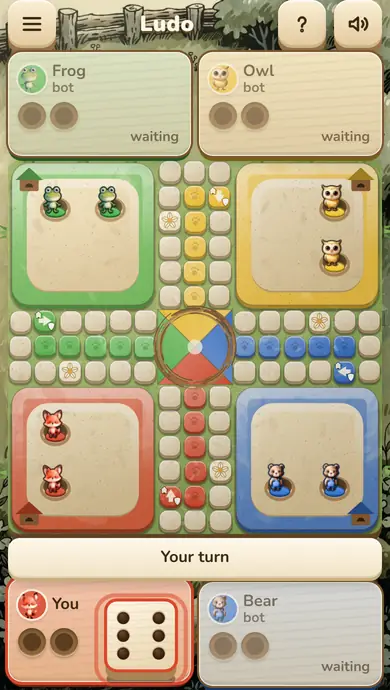
Tap the die to roll, then tap the animal you want to move. An animal leaves its burrow only on a six, and a six gives one more roll, as do a catch and an animal reaching the nest. Finish a move on a rival's cell and the rival goes back to its burrow. Stars and start cells are safe, a third six in a row burns the turn, and only an exact roll takes an animal into the nest. The first family to bring all four animals home wins.
Questions about Ludo 2 player
Can I play Ludo 2 player against the computer?
Yes. The second seat is the computer by default; pick the calm or the bold player before the match.
Can two people play on one device?
Yes. Switch the second seat to a friend and pass the phone or share the computer. There is no network play: both players use the same device.
Ludo is the classic race board game for 2–4 players. Roll the die, bring your tokens out of the burrow with a six, race around the yard and get all four home first. Land on a rival to send it back — and roll again. Play against friendly or bold computer neighbours, or pass the device between friends.
Ludo is a race with a die, but your choices matter: which animal to bring out, when to catch and where to wait safely.
New to Ludo? Every family starts with its animals in the burrow. Tap the die to roll; a six brings an animal out onto your start cell. Then move your animals around the board and into the nest in the centre.
Before your next move
Stopping one or two cells in front of a rival on an ordinary cell invites a catch.
Running one animal home while the others sit in the burrow leaves you with no choice on a bad roll.
Browser edition
Play in your browser. No app download is needed.
Questions about Ludo
Do you need a six to start in Ludo?
Yes. An animal leaves its burrow only on a six, and the six gives one more roll.
What happens when you land on another player?
The rival's animal goes back to its burrow and needs a new six to come out; you roll again. Stars and start cells are safe.
Do you need an exact roll to finish?
Yes. Only an exact roll takes an animal into the nest; if the roll is too big, move another animal or the turn passes.
Original ManyPlay game. Controls and examples were checked against the browser edition; cover illustrations are labelled separately from gameplay captures. Report a changed rule or control.