Full screen gives the board and the tray your whole screen: bigger pieces, no page around them. On a computer it is the place for 96 pieces. Press Esc or the full-screen button again to come back; in the game you can also open full screen from the pause menu. It is the same free game - 30 cats to collect, the Daily puzzle and no download.
How to play
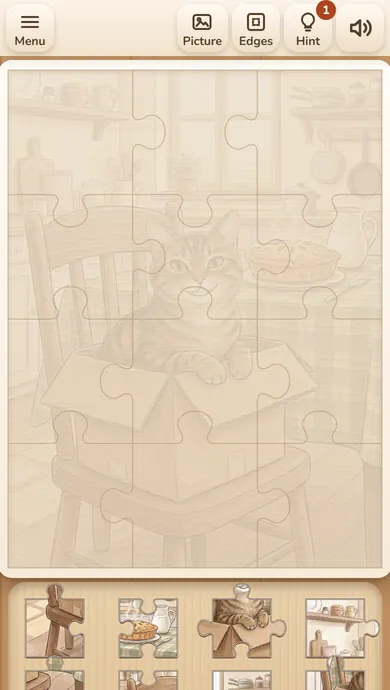
Drag a piece from the tray onto the board and let it go near its place - it snaps in. Put a piece next to its true neighbour and the two join and move together. Hold Picture to see the whole cat, press Edges to keep only the pieces with a straight side in the tray, and use the free Hint to put one piece in its place. Finish the picture and the cat comes alive and joins your collection.
Questions about Free online jigsaw puzzles full screen
Is the full screen puzzle free?
Yes. It is the same free game, opened across the whole screen.
How do I leave full screen?
Press Esc on a computer, or press the full-screen button again.
Every picture in Purr Pieces is a cat with a name - finish the puzzle and it joins your collection. Drag pieces from the tray onto the board; a piece let go near its place snaps in, and neighbours join and move together. Choose 12, 24 or 48 pieces, and 96 on a larger screen, play the Daily puzzle with the same cat for everyone, or open the modes for kids and for big pieces. There is no countdown and no sign-up, and your game and your collection are kept in this browser.
A jigsaw puzzle has one answer, but the order is yours: the frame first, the cat first or the colours first.
New to jigsaw puzzles? The board shows a pale outline of every place, and the pieces wait in the tray. Drag a piece onto the board and let it go near its place - it snaps in.
Before your next move
Dragging a piece far from its outline: it stays where you leave it until you bring it near its place.
Using the free Hint on the first piece - it is more useful on the plain background at the end.
Browser edition
Play in your browser. No app download is needed.
Questions about Purr Pieces
Do the pieces have to be exactly in place?
No. Let a piece go near its place and it snaps in; in the mode for kids it snaps in from even further away.
Can I rotate pieces?
No, pieces are never rotated in Purr Pieces: each one already faces the right way, you only move it.
What happens when I finish?
The cat comes alive and joins your collection, and you see your time, moves and best time for that cat and size.
Original ManyPlay game. Controls and examples were checked against the browser edition; cover illustrations are labelled separately from gameplay captures. Report a changed rule or control.