Start here
New to jigsaw puzzles? The board shows a pale outline of every place, and the pieces wait in the tray. Drag a piece onto the board and let it go near its place - it snaps in.
 NewPurr Pieces
 NewWord Burrow
 NewTic Tac Toe
 NewHangman
 NewMahjong Connect
 NewLudo
 New3D Snake
 NewBubble Shooter
 NewBlock Puzzle
 NewCrossword
 NewWord Search
 New2048
 NewFreeCell
 NewChess
 NewMinesweeper
 NewMahjong
 Dead Moon Relay
 Gridora
 COMET
 Molecular
How to play jigsaw puzzles in one sentence: drag each piece to its place on the board, let it go and it snaps in, until the picture is whole. Below is a real puzzle from the game, step by step, and then every rule in detail.
Play Purr Pieces →A ManyPlay browser walkthrough · Checked . Screenshots below show the actual game. The catalog image is also a real browser capture. Who publishes these games?
Verified opening-board solution
New to jigsaw puzzles? The board shows a pale outline of every place, and the pieces wait in the tray. Drag a piece onto the board and let it go near its place - it snaps in.
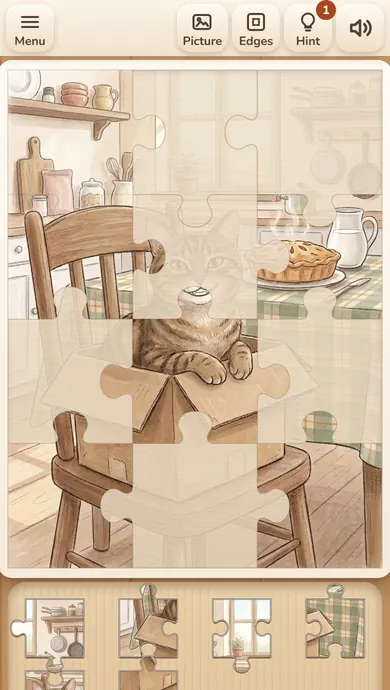
Here is a real puzzle from the start: cat No. 1, Whiskers, cut into 12 pieces - 3 across and 4 down. All twelve pieces wait in the tray under the board.
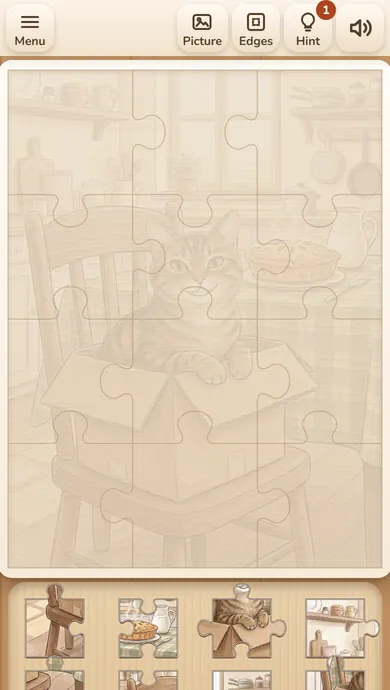
Drag the pieces one by one to the outlines on the board. Each one snaps in when you let it go close to its place; after six pieces the chair, the table and the cat in the box already show.
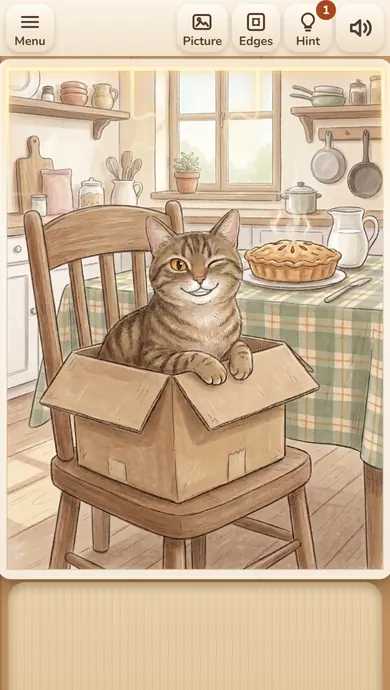
Put the twelfth piece in and the picture is whole. The seams fade, and Whiskers blinks and moves - the cat has come alive.
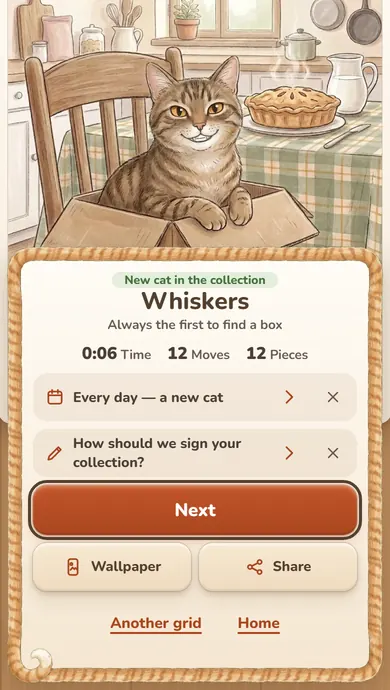
The window says New cat in the collection: Whiskers, always the first to find a box, with the time 0:06, 12 moves and 12 pieces. Next takes you to the next cat.
Pieces snap in only in their own places, so a puzzle can not go wrong - it only takes the time you choose. Bigger sizes take longer and are more fun with the frame first.
No. Let a piece go near its place and it snaps in; in the mode for kids it snaps in from even further away.
No, pieces are never rotated in Purr Pieces: each one already faces the right way, you only move it.
The cat comes alive and joins your collection, and you see your time, moves and best time for that cat and size.
The game also has 24, 48 and 96 pieces, the Daily puzzle, the modes for kids and for big pieces, and 30 cats to collect. This example checks one 12-piece puzzle in the browser build, not every cat or size.
Report a changed rule or control The date describes this walkthrough, not a new game release.
A jigsaw puzzle is a picture cut into pieces that fit only one way. In Purr Pieces every picture is a cat with a name, and the pieces snap into place when you let them go close enough, so you can enjoy the picture instead of chasing pixels.
Every picture in Purr Pieces is a cat with a name. Put all the pieces of the picture in their places and the cat comes alive - it blinks and moves - and its card joins your collection.
The board shows a pale outline of every place, so you can see the shape of the picture from the start. The pieces wait in the tray - beside the board on a computer, under it on a phone. When the tray is full, a small note shows how many more pieces wait behind.
The pieces wait in the tray beside the board on a computer and under it on a phone. Drag a piece with your finger or the mouse; a piece from the tray grows to its board size under your finger.
Let a piece go near its place and it snaps in. You do not need pixel precision: close enough is enough, and pieces are never smaller than a fingertip on a phone.
Put a piece next to its true neighbour and the two join; a joined group moves together, so you can build parts of the picture anywhere and bring them in.
Most players build the frame first. Press Edges and only the pieces with a straight side stay in the tray; the corners have two straight sides. When the frame is done, Edges turns off by itself and the other pieces come back.
Hold Picture to see the whole cat. Edges leaves only the pieces with a straight side in the tray, for the frame first. Hint puts one piece in its place - one free hint in every puzzle.
Classic lets you pick any cat you have opened and 12, 24, 48 or 96 pieces; the game offers only the sizes that stay big enough to grab on your screen, so 96 pieces are for a computer or another large screen. The Daily puzzle is one cat with 24 pieces, the same for everyone that day. The mode for kids has 4, 6 or 12 big pieces that snap in more easily, and the mode with big pieces makes the pieces, buttons and captions larger.
There is no countdown. The time from your first move to the last piece is shown when you finish, without pauses, with your best time for that cat and size.
Every cat you finish joins your collection with its name and a short story; finish all 30 and a bonus cat opens. From a collected card you can save the cat as a phone wallpaper or share it.
Start with the edges: press Edges, build the frame, and the middle gets much easier. Hold Picture for a second to see where the colours go - the cat, the window, the table. Sort by colour: build the cat itself first, then the background around it. Join neighbours in the tray area and move the whole group to the board at once. Keep the free Hint for the last tricky pieces of the background.
Explanation checked 2026-11-17. Studio spec docs/gdd/spec/01_rules.md and 04_page.md, src/game/config.js and l10n/strings.json (git-house-morn/purr-pieces 311c2fc), checked against a real 12-piece puzzle and the modes ?mode=daily|kids|large in the browser 2026-11-17