Printable Word Search opens a medium puzzle with the print window already open, so a fresh sheet is one click away. Any puzzle can go to paper: a theme puzzle, the daily puzzle or one you made from your own words. The sheet is black on white and fits A4 or Letter, with the title and number, the 10 × 13 grid and the list of 12 words. Tick the answer key option to add a second page with every word circled, handy for a classroom or a puzzle night. Your own marks are not printed, so you can solve on screen first and still print a clean copy. It is free, with no download and no registration. Want another level? Choose easy, hard or a puzzle for kids, then press Print.
How to play
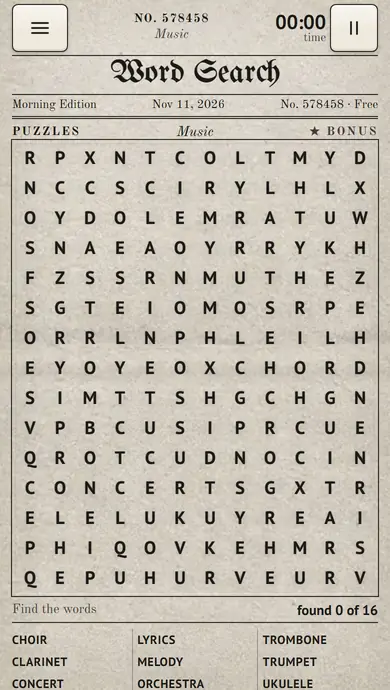
Find every word of the list hidden in the grid. Draw a line with your finger or the mouse from the first letter of a word to its last, or tap the first letter and then the last; on a computer the arrow keys and Enter work too. A found word is circled in ink and struck off the list, and the puzzle is stamped Solved when the whole list is crossed out. Press Hint and a pencil marks the first letter of a word you have not found yet; hints are unlimited.
Questions about Printable Word Search
How do I print a word search?
Press Print, choose whether to add the answer key on a second page, and print on A4 or Letter. Any puzzle prints: a theme puzzle, the daily puzzle or your own.
Are the printable word searches free?
Yes. Playing and printing are free, with no download and no registration.
Word Search is the classic newspaper puzzle, laid out like a morning paper: a grid of letters and a list of words on one theme. Find every word hidden in the grid — across, down and diagonally, and in hard puzzles backwards too. Play free on phone or computer, with no download and no registration. A new puzzle comes out every day, you can make your own from your words, and any puzzle prints with an answer key.
A word search rewards a plan: start where the grid gives itself away, and on hard grids read every line both ways.
New to word search? The list on the page names every hidden word. Draw a line from the first letter of a word to its last, or tap both ends, and the word is circled in ink and struck off the list.
Before your next move
Reading only from left to right on a hard grid misses the words that run backwards or upwards.
A line one letter too long or too short does not count: start and end exactly on the word.
Browser edition
Play in your browser. No app download is needed.
Questions about Word Search
Can words cross in a word search?
Yes. Words may cross and share a letter, so one letter can belong to two words.
What is the bonus word?
One more word of the theme hides in the grid but not on the list. You do not need it to win; it is there for sharp eyes.
Does the game keep score?
No. The top bar shows your time, which starts with your first move, and how many words you have found. Your progress is saved in this browser.
Original ManyPlay game. Controls and examples were checked against the browser edition; cover illustrations are labelled separately from gameplay captures. Report a changed rule or control.